#3. Template Management
Sync Templates are the top-level configuration in iSyncSF. Each template defines the target org, sync behavior options (delta, deleted records, error handling), and the list of Salesforce objects to migrate. Templates are reusable and can be scheduled or run on demand.
Purpose: Templates are the central configuration unit of iSyncSF. A template defines WHAT data to sync and HOW the sync should behave (error handling, delta sync, deleted records, etc.). Think of a template as a "sync recipe" - it captures all the rules for a specific data migration scenario that can be reused repeatedly. Where It Fits: This is Step 3 in the configuration workflow. After connecting to a target org, users create a template to define their sync strategy. A single org connection can be used by many templates (e.g., one template for "Customer Data", another for "Product Catalog"). The template is the hub that ties together template lines, object settings, and execution.
#3.1 Creating and Managing Templates
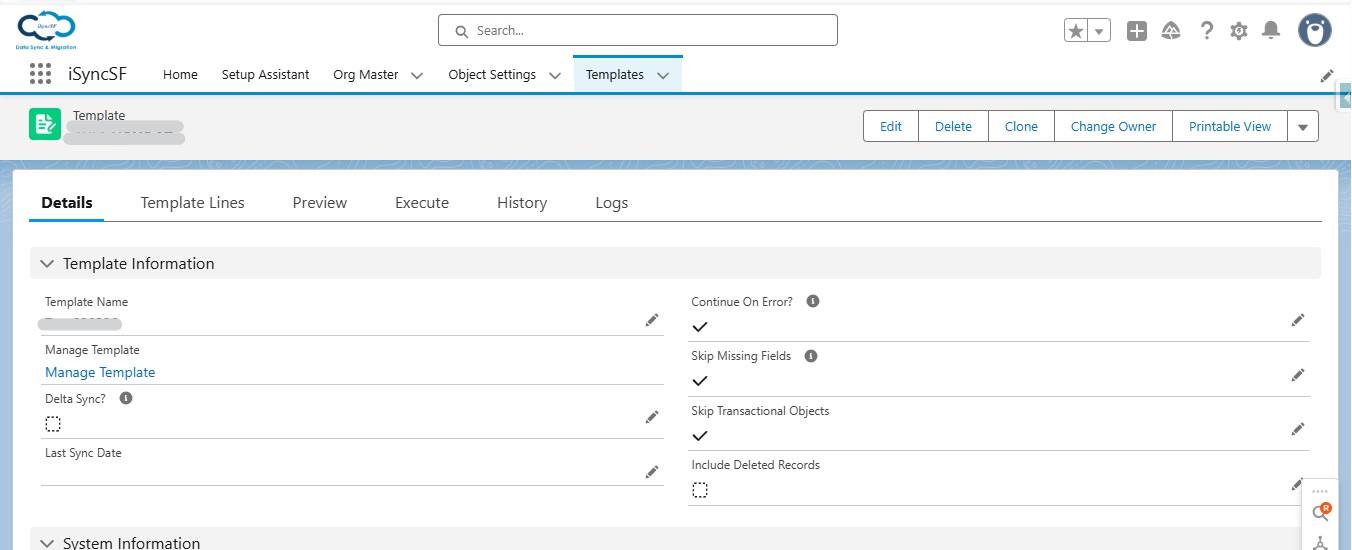
A template is the core configuration unit. It defines the overall sync behavior.
What Users Can Do:
- Create New Templates - Define a sync configuration with a descriptive name
- Configure Template Settings (in form order):
- Template Name - Logical name for reference
- Continue On Error - If checked, the sync continues even when individual records fail (partial success). If unchecked, the sync stops on the first error
- Skip Transactional Objects - If checked, objects defined as "transactional" in the System Properties are excluded from the sync
- Delta Sync (Continuous Sync) - If checked, only records modified since the last sync date are included. Useful for ongoing incremental synchronization
- Last Sync Date - Automatically maintained; can be manually overridden. Used as the baseline for delta sync
- Skip Missing Fields - If checked, fields that don't exist on the target are silently skipped. If unchecked, missing fields cause an error
- Include Deleted Records - If enabled, deleted records (still in the recycle bin) on the source will trigger deletion of matching records on the target
- Preview Batch Size - Controls how many records are processed per batch during the scan/preview phase (reduce if objects have many child relationships)
- Save Templates - Save configuration changes
- Delete Templates - Remove templates that are no longer needed
#3.2 Template Tabs
The template management page is organized into 5 tabs:
- Template Details - The main configuration form described above
- Template Lines - Configure which objects to sync (see Template Lines)
- Preview - Scan and preview record counts before syncing (see Preview/Scan)
- Execute - Run the sync and monitor progress (see Execute tab)
- History - View past sync execution results (see Sync History)