#4. Template Lines
Template Lines define which Salesforce objects are included in a sync and in what order. Each line specifies an object API name, an optional SOQL filter, sort order, record limit, and up to five levels of child object relationships — giving you precise control over scope.
Purpose: Template lines define the specific Salesforce objects to include in the sync and how to query them. While the template sets the overall strategy, template lines specify the actual data scope - which objects, which records (via filters), in what order (via sequence), and with what record limits. They also control child object inclusion and parent relationship exclusions. Where It Fits: Template lines are configured within a template (Template Lines tab). They are Step 4 in the workflow. Each template line produces one "branch" of the sync - the system processes them in sequence order, and each line's SOQL query determines which source records are scanned and synced. During execution, the scan phase reads these lines to discover records, and the sync phase uses them to know what data to send.
#4.1 Managing Template Lines
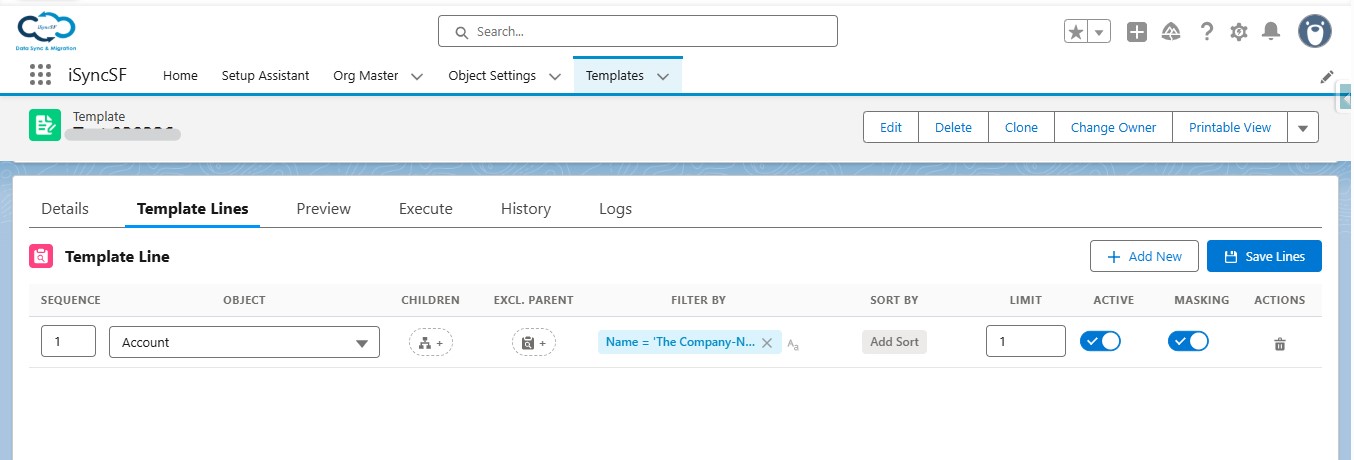
Template lines define which specific objects to sync and how to query them. Each template line represents one object (e.g., Account, Contact, Opportunity).
What Users Can Do:
- Add New Template Lines - Add objects to the sync configuration
- Configure Each Line (in grid column order):
- Sequence - Processing order (lower numbers sync first). Important for ensuring parent objects are synced before child objects
- Reorder Lines - Change the processing sequence by editing the Sequence value
- Object Name - The Salesforce object API name (e.g.,
Account,Contact,Custom_Object__c) - Exclude Parent Relationships - Exclude specific parent lookup fields from being traced during child/parent discovery
- Filter (WHERE Clause) - Filter which records to include using either:
- Guided Condition Builder - Visual UI for building conditions with field pickers, operator selectors, and value inputs. Supports groups with AND/OR logic and nested groups
- Raw SOQL Text - Type a WHERE clause directly (e.g.,
Type = 'Customer' AND CreatedDate > 2024-01-01) - Sort By - Order records during sync (e.g.,
CreatedDate ASC) - Limit - Maximum number of records to sync for this object
- Active - Toggle whether this line is included in the sync
- Skip Masking - Bypass data masking rules for this specific template line
- Delete Lines - Remove template lines with a confirmation dialog
- Bulk Save - Save all template line changes at once (inline edits across multiple lines are committed together)
#4.2 Configure Related (Child) Objects
 Objects.jpg)
For each template line, users can configure which child objects should be included in the sync.
What Users Can Do:
- Open Child Configurator Modal - Click the relationship icon on a template line
- Browse Object Hierarchy - Navigate a tree of related child objects (up to 5 levels deep)
- Select/Deselect Child Objects - Toggle which child relationships to include
- Configure Each Child Object:
- Filter (WHERE Clause) - Apply filters to child records
- Sort By - Order child records
- Limit - Cap the number of child records per parent
- Exclude Parent Relationships - Exclude specific lookups on the child object
- Tree Navigation - Expand/collapse the child object tree to see nested relationships
- Save Configuration - The child object configuration is stored as JSON in the template line record
#Template Line Fields Reference
Each template line configures the following:
- Object API Name: The Salesforce object to sync (e.g., Account, Contact, CustomObject__c).
- Sequence: The processing order for this line relative to others. Lower numbers are processed first.
- SOQL Filter (Where Clause): An optional filter condition applied to the source query (e.g.,
CreatedDate > LAST_N_DAYS:30). Do not include the WHERE keyword. - Sort Order (Order By): An optional ORDER BY clause for the source query (e.g.,
CreatedDate ASC). - Record Limit: Maximum number of records to retrieve. Leave blank for no limit.
- Skip Masking: When checked, data masking rules are bypassed for records synced through this line, even if masking is configured in Object Settings.
- Is Active: Uncheck to temporarily exclude this line from sync without deleting it.
#Configuring Child Objects
Click the Configure Related button on a template line to open the child object configurator. This modal lets you define up to 5 levels of child object relationships. For each child relationship, you specify:
- The relationship field — the lookup or master-detail field pointing back to the parent
- Optional filter conditions to limit which child records are included
iSyncSF uses this hierarchy to determine insertion order — parents are always inserted before their children, and source-to-target ID mapping is handled automatically.