#6. Preview / Scan Tab
The Preview/Scan tab in iSyncSF lets you validate your template configuration before moving any data. It counts records per object, resolves parent-child relationships, and builds the migration order — so you can confirm scope and catch issues before executing the sync.
Purpose: The Preview/Scan feature lets users see exactly how many records will be included in the sync BEFORE actually moving any data. It discovers parent-child relationships, counts records per object, and computes the migration order. This is a "dry run" that helps users verify their template configuration is correct and understand the scope of the sync. Where It Fits: Scanning is the first step of execution (Preview tab on the template). Users should always scan before syncing to validate their configuration. The scan creates audit log entries that the sync phase later uses to process records. Scanning does NOT send any data to the target org - it only analyzes the source data. After scanning, users can proceed to the Execute tab to actually run the sync, or go back and adjust their configuration.
#6.1 Scanning Records
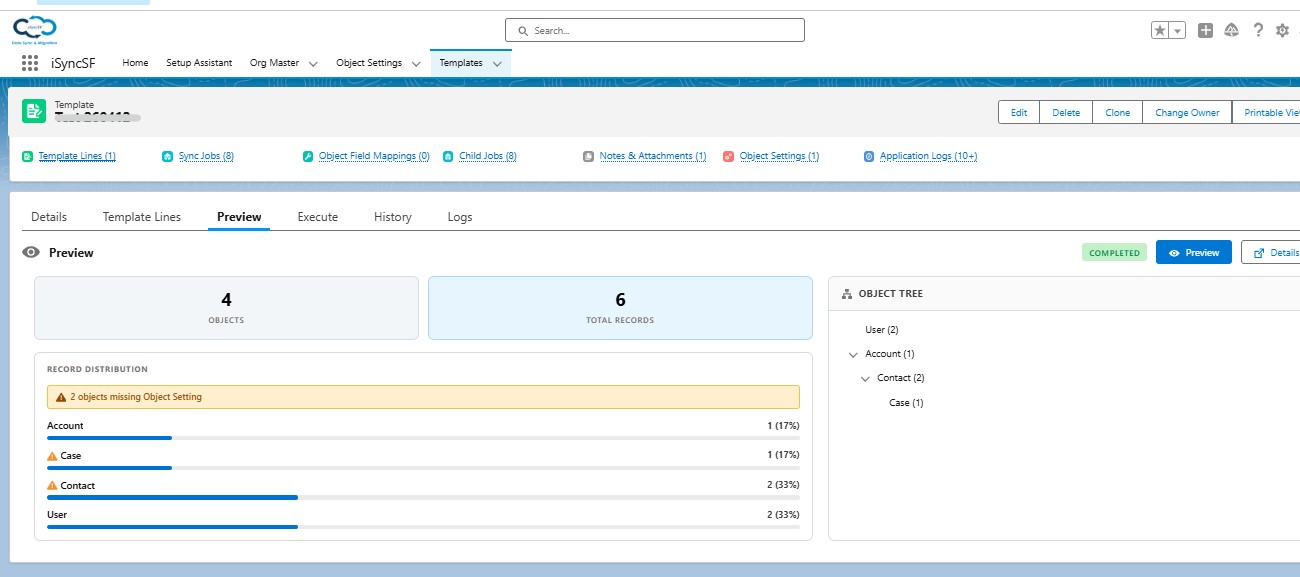
Before executing a sync, users must run a preview scan to discover how many records will be included.
What Users Can Do:
- Start Scan (Preview) - Click to begin scanning source records based on the template configuration
- Monitor Progress - View real-time progress with:
- An elapsed timer showing how long the scan has been running
- A progress indicator
- Periodic partial data updates (every ~130 seconds during the scan)
- View Scan Results - After the scan completes, see:
- Object Hierarchy Tree - A visual tree showing parent-child relationships between objects
- Record Counts - Number of records found for each object
- Migration Order - The order in which objects will be processed during sync
- Abort Scan - Cancel a running scan if needed
- Auto-Abort - The system automatically aborts after 10 consecutive identical errors
#6.2 Scan Actions After Completion
- Review the scan results to verify the expected data scope
- Proceed to the Execute tab to start the actual sync
- Re-scan if configuration changes are made