#2. Org Connection
iSyncSF connects to target Salesforce orgs using OAuth 2.0 Web Server flow or Named Credentials. Each connection is stored as an Org Master record with encrypted tokens that auto-refresh, allowing iSyncSF to sync data without re-authenticating between runs.
Purpose: Establishes a secure, authenticated link between the source Salesforce org and one or more target (destination) orgs. Without a connection, no data can be sent to the target. The connection handles authentication, token management, and verifies the target org has the iSyncSF package installed. Where It Fits: This is Step 2 after initial setup. Each target org needs its own OrgMaster record and OAuth connection. Once connected, the org is available for selection when running any sync template. Tokens are automatically refreshed by a background scheduler so connections stay alive.
#2.1 Connecting to a Target Org
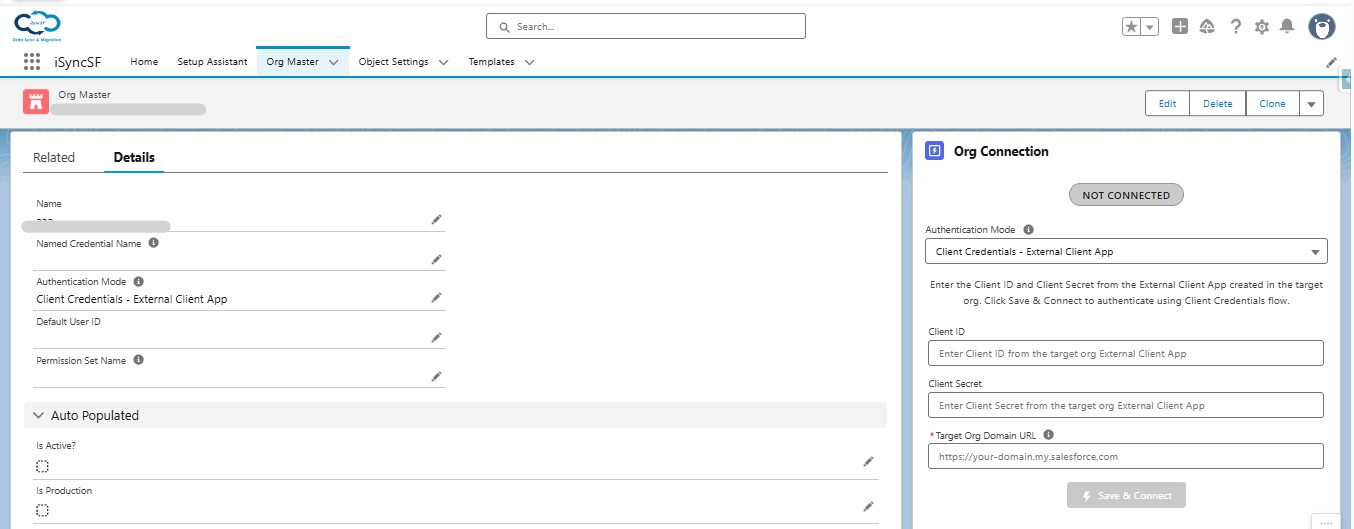
Before syncing data, users must connect their source org to one or more target (destination) Salesforce orgs.
What Users Can Do:
- Create Org Master Records - Each target org is represented by an OrgMaster record containing connection details
- Authenticate via Mode - Choose how iSyncSF authenticates to the target org. The recommended default is Client Credentials - External Client App (server-to-server, no user prompt). Other options include OAuth 2.0 Web Server - External Client App, OAuth 2.0 Web Server (Connected App), and Named Credentials
- Authenticate via OAuth - Click "Connect" to initiate an OAuth 2.0 authorization flow:
- A popup window opens to the Salesforce login page
- User logs into the target org and authorizes access
- The system securely stores the access token and refresh token (encrypted with AES-256)
- Connection status shows as "Connected" with a green indicator
- Test Connection - Verify the connection is still active
- Disconnect - Revoke access and clear stored credentials
- View Org Details - See the connected org's name, ID, instance URL, and whether it's a Production or Sandbox environment
- Package Verification - The system checks whether the iSyncSF package is also installed on the target org (required for the receiver endpoint)
Connection Options:
- Client Credentials - External Client App - Server-to-server authentication (recommended for automated syncs). Tokens are auto-refreshed.
- OAuth 2.0 Web Server - External Client App - Interactive OAuth with per-org credentials
- OAuth 2.0 Web Server (Connected App) - Legacy interactive OAuth with global credentials
- Named Credentials - Uses Salesforce Named Credentials for authentication
#2.2 Selecting a Target Org for Sync
- When executing a sync, users select the target org via a modal dialog
- The modal shows all configured OrgMaster records with connection status, credential type, and Production/Sandbox badges
- Users can filter the org list to find the desired target