#11. Org Compare
iSyncSF Org Compare scans the schema of your source and target Salesforce orgs and identifies mismatches — missing fields, mismatched picklist values, absent objects, and record type differences. Many gaps can be auto-resolved directly from the UI before you run a sync.
Purpose: Org Compare is a pre-sync validation tool that ensures the target org's schema matches the source org. If the target is missing objects, fields, picklist values, or record types, the sync will fail or produce data loss. Org Compare identifies these mismatches upfront AND can automatically fix many of them (create missing fields, add missing picklist values, etc.). This eliminates the most common cause of sync failures. Where It Fits: Org Compare should be run before the first sync to a new target org, and periodically when either org's schema changes. It sits between configuration and execution in the workflow. It's optional but strongly recommended - it catches problems that would otherwise surface as errors during sync execution. The auto-resolve feature can save significant manual setup time on the target org.
#11.1 Comparing Metadata Between Orgs
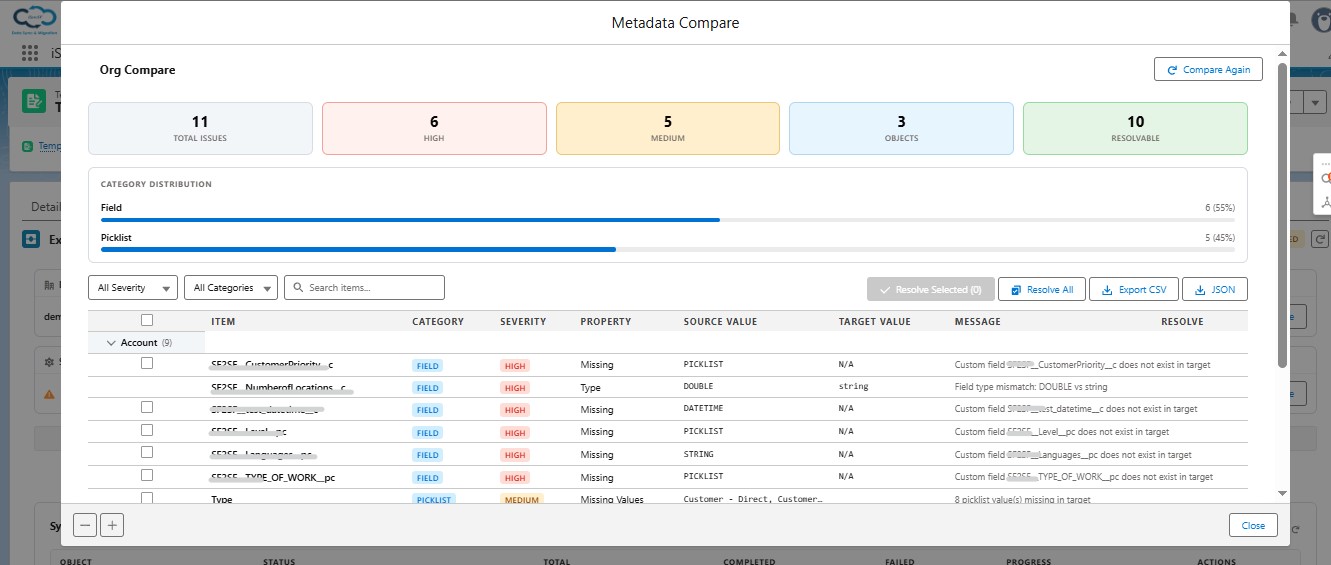
Org Compare lets users check whether the target org has the same schema (objects, fields, picklists, record types) as the source org before running a sync.
What Users Can Do:
- Run a Comparison - Start a comparison between the source and target org schemas
- Two Comparison Modes:
- Template-Bound (Mode A) - Compare only the objects included in a specific template
- Standalone (Mode B) - Compare any set of objects independently of a template
- View Comparison Results:
- Object Mismatches - Objects that exist in source but not in target
- Field Mismatches - Fields missing from the target or with different types/lengths
- Picklist Mismatches - Picklist values present in source but missing from target
- Relationship Mismatches - Lookup/relationship differences
- Record Type Mismatches - Record types missing from the target
- Severity Levels:
- High - Issues that will likely cause sync failures (e.g., missing required fields, missing objects)
- Medium - Issues that may cause data loss but won't necessarily fail (e.g., field length differences, missing picklist values)
- Filter Results - Filter by object, category, or severity
- Auto-Resolve Differences - Automatically fix detected mismatches:
- Create missing objects on the target
- Create missing fields on the target
- Add missing record types
- Add missing picklist values
- Fix field property mismatches
- Export Results - Download comparison results as CSV or JSON
#11.2 Resolve Progress
- Monitor Resolution - Track progress as the system resolves mismatches
- View Resolution Status - See which items were successfully resolved and which failed
- Email Notification - Receive an email when the resolution batch completes
#Auto-Resolve Capabilities
When Org Compare identifies schema differences, the Auto-Resolve feature can automatically fix many common gaps:
- Missing fields: Creates the field in the target org with matching type, length, and label
- Field length differences: Extends the target field length to match or exceed the source field length
- Missing picklist values: Adds missing picklist values to the target field's value set
- Missing record types: Creates missing record types in the target org
Auto-Resolve uses the Salesforce Metadata API to deploy changes to the target org. A progress indicator shows the deployment status, and results are displayed once the deployment completes.
#Resolve Progress Tracking
After initiating Auto-Resolve, a progress tracker displays the current deployment status. The resolve process runs as a background job in the target org — the UI polls for completion and updates the status automatically. Once resolved, the comparison results refresh to show the updated state. Items that were successfully resolved are removed from the mismatch list.